SMS Spam Calls in Microsoft Teams
Table of Contents
Prevent spam or phishing attempts from external chats in Microsoft TeamsPrevent spam or phishing attempts from external chats in Microsoft Teams
When Teams detects potential spam or phishing activity (also known as impersonation) from someone requesting to chat with you from outside your organization, you'll see a notification.
Impersonation is a common type of cyberattack in which the sender assumes the identity of a specific person or entity to deceive the recipient.
When you see the following screen in a one-on-one chat or group chat, please take these actions to ensure your security:
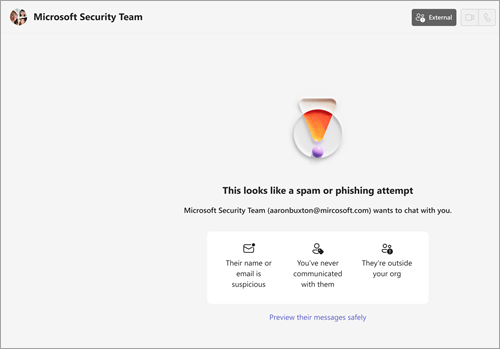
- Double-check the sender's identity, including their name and email address.
- Preview the message and check for anything that looks unusual or suspicious.
- Only accept the conversation if you're sure the sender is trustworthy.
- Choose Accept if you trust the sender. Choose Block to stop receiving any Teams communication.
You are likely getting more spam texts because scammers often buy lists of active numbers. Your number might have been part of a data breach, or you might have accidentally interacted with a spam message, confirming your number is active and leading to more offers. These attacks, known as "smishing," are increasing, with scammers using spoofed numbers and sophisticated tactics to get you to click links that lead to the collection of your personal information.
Common Reasons for Sudden Spam Increase
- Data Breaches: Your information, including your number, may have been exposed in a company data breach.
- Accidental Interaction: Replying "STOP" or clicking a link in a previous spam text confirms your number is active, making it more valuable to scammers.
- Phone Number Harvesting: Calling toll-free numbers or filling out online forms can sometimes add your number to lists sold to spammers.
- Spoofing: Scammers frequently change numbers (spoofing) or use automated systems, so blocking one number doesn't stop them all.
- Reporting Spam in Canada: Complaints about unsolicited phone calls should be sent to the Spam Reporting Centre via its National Do Not Call List.
What to Do About It
- Don't Reply: Never reply to spam texts, even if you're just saying "STOP," as this confirms your number is active.
- Block Numbers: Use your phone's built-in block feature, but understand this is temporary as numbers change.
- Enable Spam Filters: Turn on your phone's built-in spam protection in your messaging settings.
- Be Cautious Online: Don't share your number on untrustworthy sites and read privacy policies on form report spam and block specific phone numbers directly in your mobile phone's messaging app: